Understanding this is important because it explains why JavaScript behaves the way it does - especially when dealing with scope, hoisting, callbacks, and debugging unexpected behavior.
When you know how execution works internally, reading, writing, and debugging JavaScript becomes much more predictable.
When JavaScript starts running a file, it does not execute the code immediately line by line.
Instead, it follows a fixed process to prepare the environment and then execute the code in a controlled way.
Let’s walk through what actually happens, step by step.
Step 1: JavaScript Starts Running the File
The moment a JavaScript file is loaded (in a browser or Node.js), JavaScript creates a Global Execution Context.
This is the starting point of your entire program. Nothing can run without this context.
At this moment:
- No code has executed yet
- JavaScript is only preparing to run the program
Step 2: Global Execution Context Is Created
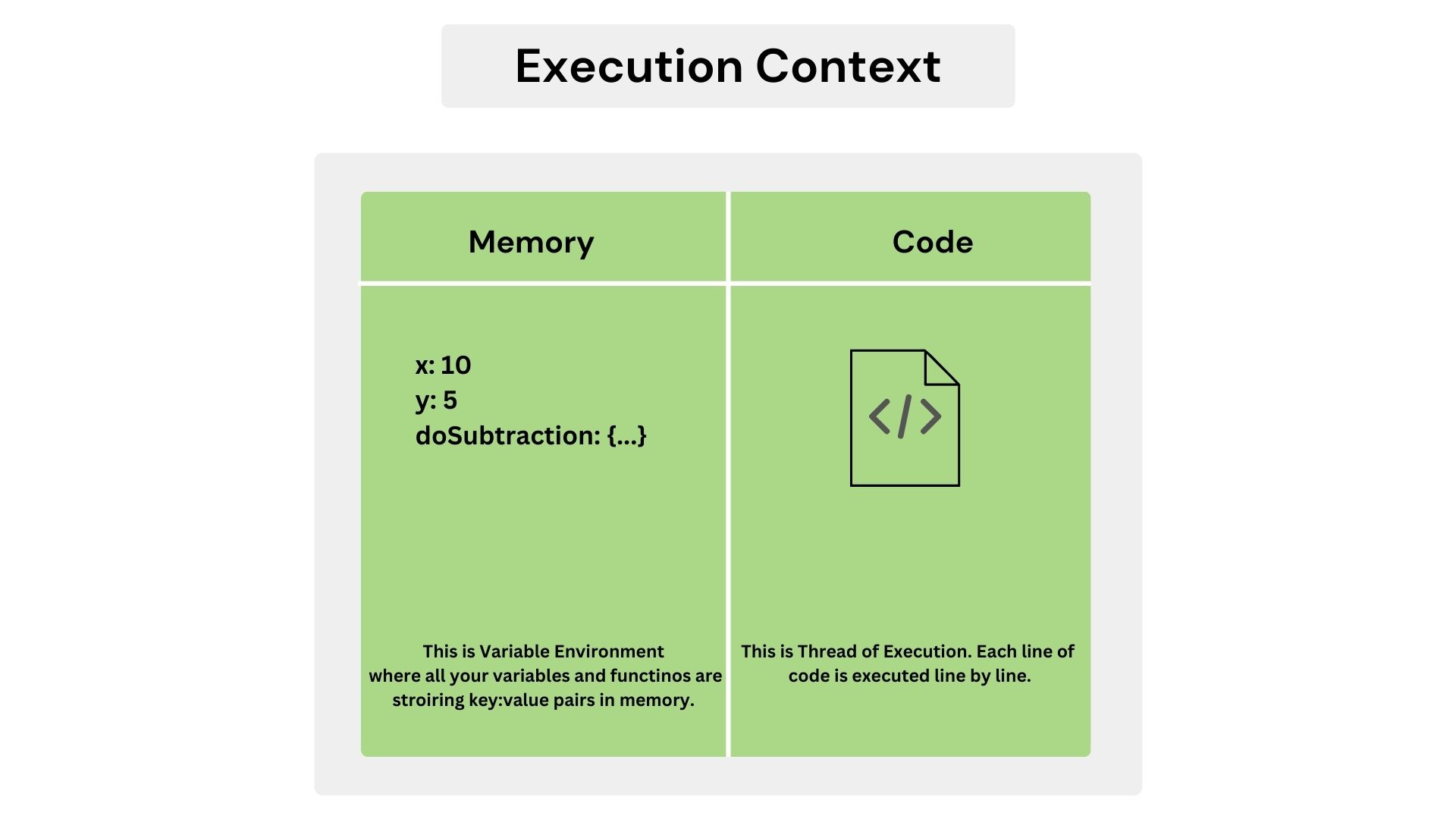
The Global Execution Context is the environment where:
- Global variables live
- Global functions live
- The this keyword is defined
This context is created in two phases.
Step 3: Memory Creation Phase (Preparation Phase)
In this phase, JavaScript scans the entire file from top to bottom and allocates memory.
What happens here?
Variables
- var variables are allocated memory and initialized as undefined
- let and const are allocated memory but not initialized Accessing them now causes an error (Temporal Dead Zone)
- Accessing them now causes an error (Temporal Dead Zone)
Functions
- Function declarations are fully stored in memory
- This allows calling them before they appear in the code
Scope Information
- JavaScript determines how variables will be searched in nested scopes
Important: No code runs in this phase. This is only setup.
Step 4: Execution Phase Begins
Now JavaScript starts executing the code line by line, from top to bottom.
- Values are assigned to variables
- Functions are executed when called
- Each function call creates a new execution context
Step 5: Function Call and New Execution Context
When JavaScript encounters a function call:
- A Function Execution Context is created
- It goes through the same two phases: Memory creation Execution
- Memory creation
- Execution
- This context is pushed onto the call stack
Step 6: Call Stack Controls Execution
JavaScript uses a call stack to track execution contexts.
- The Global Execution Context is pushed first
- Each function call is pushed on top
- When a function finishes, it is removed
This follows the Last In, First Out (LIFO) rule.
Short Code Example
console.log(x);

sayHello();

var x = 5;

function sayHello() {
  console.log("Hello");
}
How JavaScript processes this:
Memory Creation Phase
- x → undefined
- sayHello → function stored in memory
Execution Phase
- console.log(x) → undefined
- sayHello() → function executed
- x = 5 → value assigned
Step 7: Program Finishes Execution
Once the last line of code is executed:
- The call stack becomes empty
- The Global Execution Context is removed
- The program ends
Best Way to See This in Actions on screen:
Open Chrome DevTools → Sources tab Add breakpoints and step through the code.
Watch:
- Execution contexts being created
- Call stack growing and shrinking
This turns theory into something you can actually see.
As Akshay Saini sir once said:
“Time, tide, and JavaScript wait for none.”
JavaScript moves forward based on its execution rules—creation phase, execution phase, and the call stack. If you understand these rules, JavaScript feels predictable. If you don’t, the same code can look confusing or even broken.
That’s why learning how JavaScript executes code is not optional—it’s the foundation for writing correct, debuggable, and reliable programs.
Thank you for reading | Hope we are growing together