Why Refresh Tokens?
Why is this important to know? Why is it interesting to implement? Why is it necessary?What problem does it actually solve?
In this blog, I will explain refresh tokens in a very simple way based on how I tried to implement them in one of my full-stack projects.
It’s a small concept, but very powerful and very useful in real-world applications.
First, What Is a Token?
Before jumping into refresh tokens, we need to understand two basic things:
- Authentication
- Authorization
Authentication
Authentication means validating who the user is.
For example, imagine we have an e-commerce website.
A customer enters their userId and password and clicks on the login button. Now what happens?
- A request goes to our backend API: /login
- The server checks whether the username and password are correct.
- If correct, the server sends back: One Access Token One Refresh Token
- One Access Token
- One Refresh Token
We can take the example of JWT (JSON Web Token) here.
So our /login API signs a JWT and sends it to the frontend.
Now the frontend has to store this token somewhere.
Where Should We Store Tokens?
The recommended approach in most real-world applications is:
- Store access tokens in memory (or secure HTTP-only cookies)
- Store refresh tokens in HTTP-only secure cookies
Avoid storing sensitive tokens in localStorage if possible because of XSS risks.
So now authentication is done. The user is validated.
Now What Is Authorization?
Authorization means checking what the user is allowed to do.
After login, the customer starts using the application.
For every action (like placing an order, viewing orders, updating profile), the backend checks:
- Is this token valid?
- Does this user have permission to do this action?
In an e-commerce app:
- Admin can manage products
- Normal users can place orders
- Partners may manage deliveries
This is called Role-Based Access Control (RBAC).
So:
- Authentication = Who are you?
- Authorization = What can you do?
This is the foundation before understanding refresh tokens.
Why Not Just Use One Access Token?
Access tokens are related to security.
Security is extremely important in real-world business applications.
Usually, access tokens have short expiry times.
For example:
- 5 minutes
- 10 minutes
- Sometimes even less
Why?
Because if someone steals your access token (for example, through a man-in-the-middle attack or some vulnerability), they can use it to:
- Perform actions as that user
- Access sensitive data
- Attack the server
As engineers, we must protect the application.
So we keep access token expiry short.
But here is the problem…
If the access token expires in 2–3 minutes, then the user will be logged out again and again.
That’s a very bad user experience.
Secure? Yes. User-friendly? No.
This is where refresh tokens come into the picture.
What Problem Do Refresh Tokens Solve?
When a user logs in, we generate:
- One Access Token (short expiry)
- One Refresh Token (long expiry)
The idea is simple:
- Access token → Used for normal API calls
- Refresh token → Used only to generate a new access token
So even if the access token expires, the user doesn’t need to log in again immediately.
This increases session time while still maintaining security.
And if someone steals the access token, they can only use it for a very short time.
That’s the main benefit.
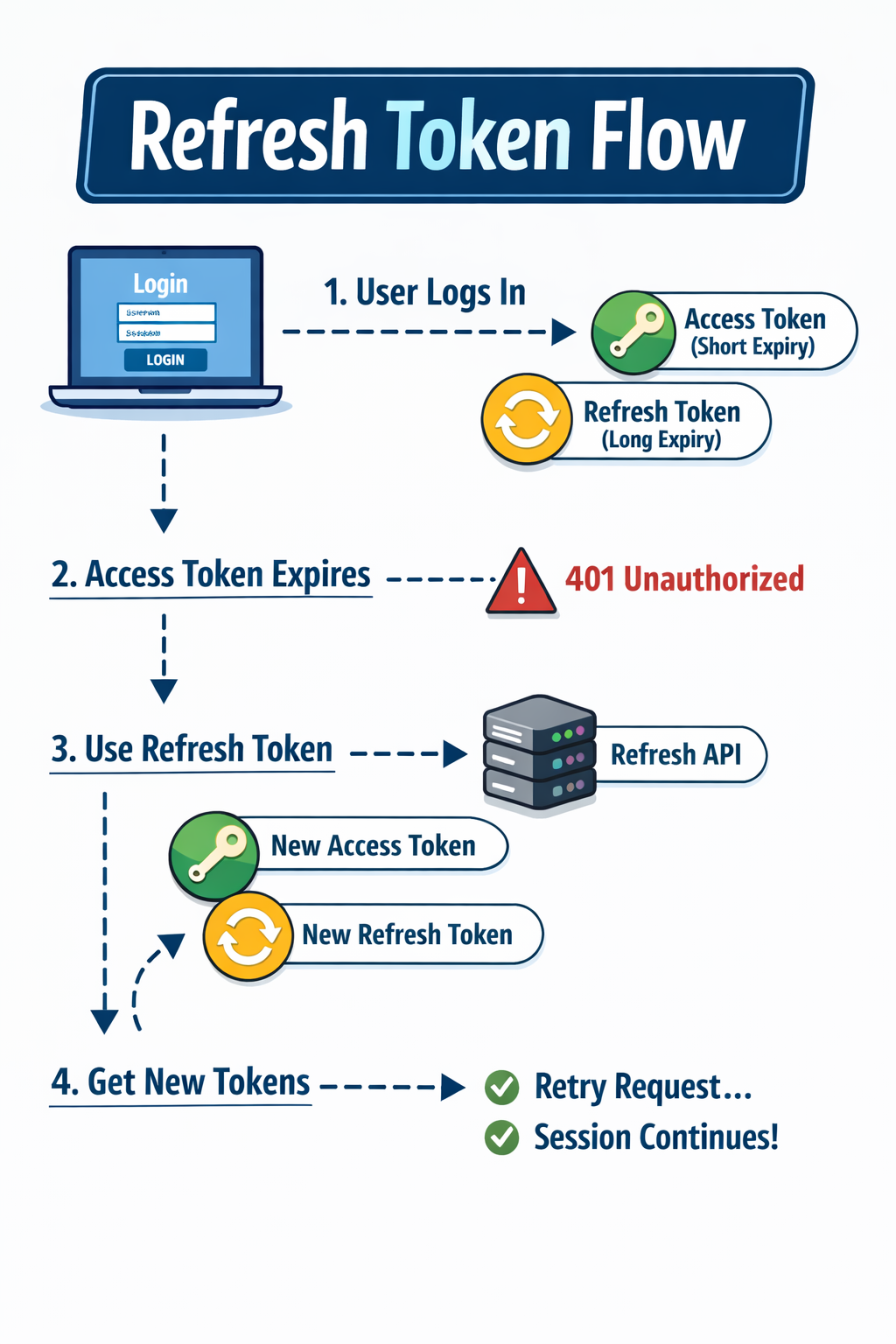
How Refresh Token Flow Works (Step by Step)
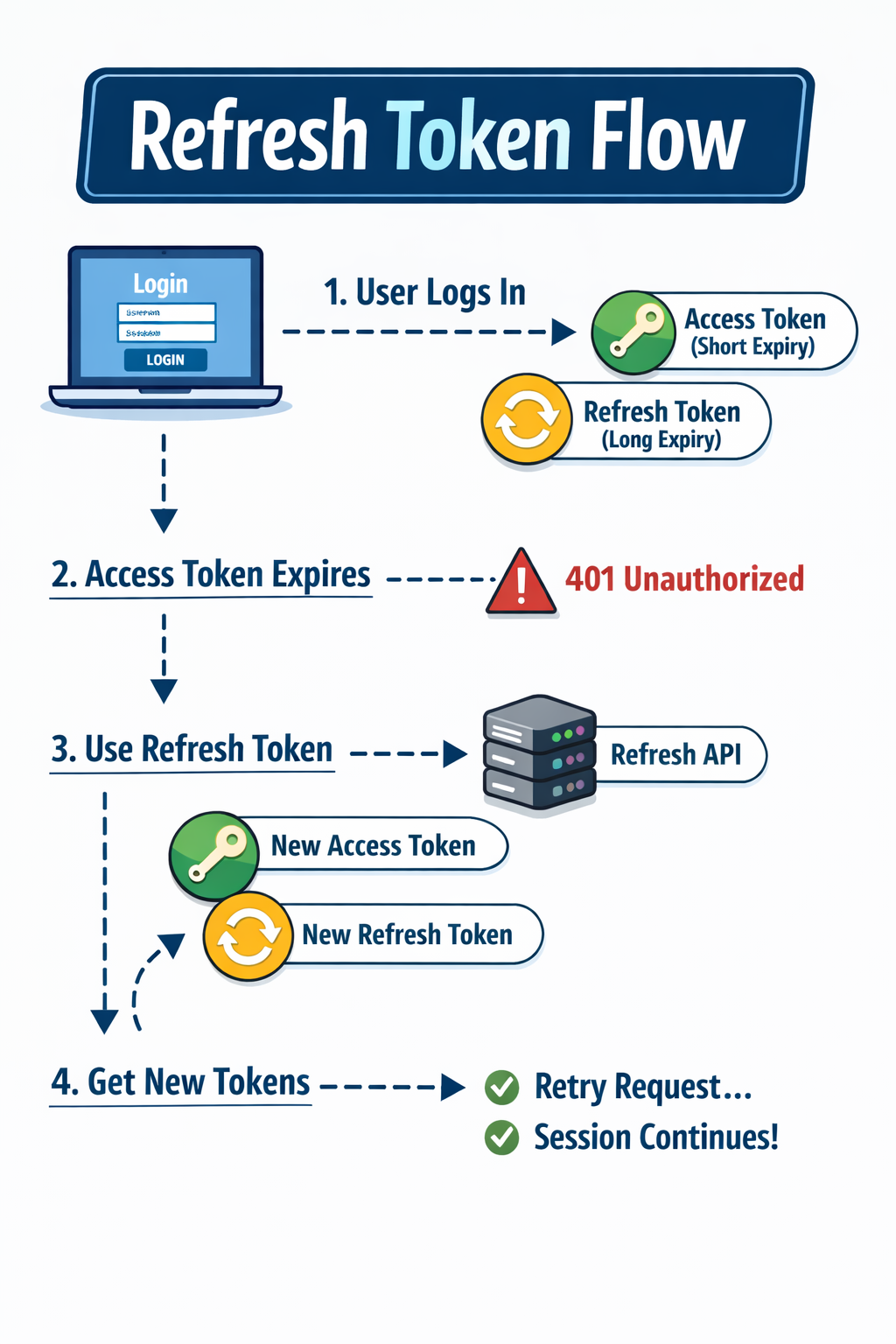
Let’s understand the real flow.
Step 1: User Logs In
Backend returns:
- Access token (short expiry)
- Refresh token (long expiry)
Frontend stores them (securely).
Step 2: User Makes API Calls
Frontend sends the access token in headers:
- Authorization: Bearer <access_token>
Backend validates it and allows the request.
Step 3: Access Token Expires
Now an API call fails.
Backend returns:
- 401 Unauthorized (or similar error)
Now the real logic starts.
Step 4: Refresh Token API Call
Frontend detects the 401 error.
Instead of logging the user out, it:
- Sends a request to /refresh
- Sends the refresh token along with it
Step 5: Backend Validates Refresh Token
Backend checks:
- Is refresh token valid?
- Is it expired?
- Is it present in DB?
- Is it revoked?
If everything is valid:
- Backend generates: New access token New refresh token
- New access token
- New refresh token
- Revokes the old refresh token in DB
- Sends new tokens to frontend
Step 6: Retry Failed Request
Frontend:
- Updates stored tokens
- Retriggers the failed API call
- User continues without even knowing anything happened
Boom. Session continues smoothly.
Why Is This More Secure?
Because:
- Access tokens expire quickly
- Refresh tokens are rotated
- Old refresh tokens are revoked
- Even if someone steals a token, its usage time is limited
It balances:
- Security
- User experience
That’s why almost all modern applications use this pattern.
Real Implementation Challenges
It looks easy in theory.
But while implementing, many issues can happen.
For example:
1. Race Conditions
If multiple API calls fail at the same time:
- All of them may try to refresh the token
- Multiple refresh calls may go to backend
- Application may hang
So we need proper handling.
Usually we:
- Create a refresh lock
- Queue failed requests
- Retry them after refresh is successful
2. State Management Issues
When tokens update:
- All parts of application must know about it
- Old token should not be used
That’s why I prefer using global state management for authentication.
So whenever token changes, the whole application listens and updates automatically.
My Experience Implementing It
When I tried implementing this in one of my full-stack projects:
- At first, it looked very simple.
- But while handling edge cases, I understood the depth.
Especially:
- Handling multiple failed requests
- Updating storage safely
- Avoiding infinite refresh loops
- Revoking old tokens properly
It gave me strong clarity about authentication systems.
You can refer to this small project where I implemented refresh token flow:
👉 https://github.com/sarthakpawse1212/Library-System
Final Thoughts
Refresh tokens may look like a small concept.
But in real-world applications, they are very important.
They help us:
- Improve security
- Maintain better user experience
- Control session management properly
When learning backend or full-stack development, don’t just use libraries blindly.
Try implementing things in small projects.
At the beginning, we don’t need perfection.
We need:
- Clarity
- Practical understanding
- Deep knowledge
That’s how real learning happens.
That’s all for this article.
If you liked it, stay tuned for more practical concepts explained in a simple way.